Digital asset management for the client handoffPut every brand asset
Put every brand asset
right where it belongs.
MP BrandDock gives agencies and brand teams one polished place to organize approved files, publish living guidelines, manage versions and let clients self-serve.



✦×
Give every client a calm, clear home for their brand.
Organize the handoff around what clients actually need: current assets, useful context, correct versions and simple downloads.
Live client access · permission controlled
Client Brand
Brand identity library
248
OverviewAssetsGuidelinesActivity
Brand Identity
Approved assets only
Client Viewer
Original + web formats
Version historyClient permissionsUsage notes
The latest asset. The right format. One click away.
Clients browse visual collections instead of decoding internal folders or emailing your team for another logo.
Inside the app
Log in to the app ↗The components your clients actually use.
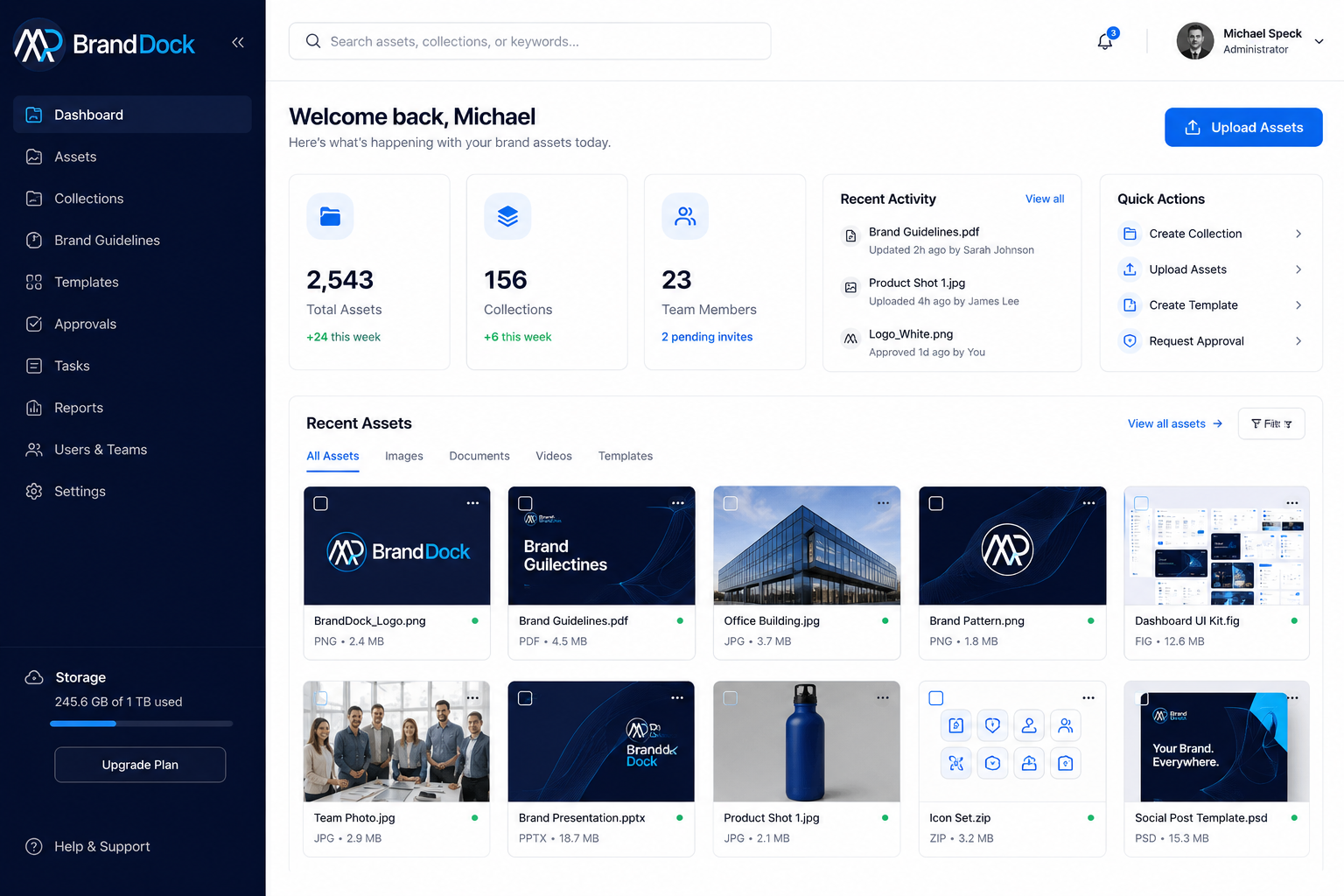
The product experience includes the core BrandDock components: dashboard metrics, asset browsing, collections, digital guidelines, approvals and reporting.
 MP BrandDock
Storage245.6 GB of 1 TB
Client workspace
Welcome back, Michael! 👋
Here’s what’s happening with your brand assets today.
Recent AssetsView all →
Primary Logo.svgSVG · ApprovedOffice_Interior.jpgJPG · ApprovedProduct_Shot_01.jpgJPG · ApprovedSocial_Post.psdPSD · ApprovedRecent ActivityView all →
- Sarah uploaded 8 assetsMarketing Campaigns · 2h ago
- James requested approvalSocial Post Template · 4h ago
- Brand Guidelines updatedTypography · yesterday
Asset library
Assets
Search, filter and download current brand files.
All AssetsImagesVideosDocumentsDesigns
Brand_Logo_Primary.svgSVG · Brand IdentityOffice_Interior.jpgJPG · PhotographyProduct_Shot_01.jpgJPG · ProductSocial_Post_Template.psdPSD · Social MediaTeam_Photo.jpgJPG · PeoplePDF
Brand_Guidelines.pdfPDF · GuidelinesOrganization
Collections
Group assets without duplicating the underlying files.
Brand Identity128 assets
Marketing Campaigns72 assets
Product Photography117 assets
Social Media68 assets
Living brand system
Brand Overview
A digital guide for consistent, recognizable brand use.
Brand Essence
Empower businesses with bold branding that drives real results.
Be the most trusted branding partner for ambitious companies.
Creativity, integrity, collaboration and excellence.
Color Palette
Primary Navy#0A1638Brand Blue#00A9EESoft Blue#E9F5FFWhite#FFFFFF
Workflow
Approvals
Review creative before it is marked approved for client use.
All (4)Pending (4)ApprovedRejected
Campaign Hero Banner.jpgMarketing Campaigns · requested by Sarah JohnsonSocial Media Post Template.psdSocial Media · requested by James LeeProduct Packaging Design.aiProduct Photography · requested by Emily ClarkInsights
Reports
Understand asset usage, downloads and storage growth.
Downloads Over TimeLast 30 days
Top Asset Types
2,543Total assets
DashboardAssetsCollectionsBrand GuidelinesApprovalsReportsUsers & TeamsUpload workflow
A platform for the quiet half of brand management.
The part after launch: keeping files current, standards visible and client delivery effortless.
Living guidelines
Put logos, colors, typography, photography rules and approved downloads in a visual brand system.
See brand guidelines ↗Visual asset library
Preview, search, tag and group brand assets without exposing your agency's internal folder structure.
Browse asset features ↗Approvals + versions
Keep version history intact and make it obvious which file is approved for client use right now.
See governance ↗One source of truth
Everything the brand needs. Nothing the client has to decode.
MP BrandDock brings the governance of a DAM together with a client experience that stays clean, visual and easy to use.
Visual asset library
Logos, photography, video, presentations, templates and source files in one visual workspace.
Fast search + filters
Find the right file by type, tag, collection, status, uploader or keyword instead of digging through folders.
Smart collections
Package campaign or stakeholder assets without copying the same binary into several folders.
Private delivery
Keep originals private and issue short-lived preview and download access only after authorization.
Version control
Replace an asset without losing history, approvals or the record of what came before it.
Client-ready portals
Give each client a polished, permission-aware destination that feels like part of the brand experience.
From handoff to self-service
A cleaner workflow for agencies and clients.
The system is designed to remove repeated file requests without giving up control over versions, permissions or brand standards.
Upload once
Agency teams upload originals directly to private object storage, including large media files.
Organize with context
Add metadata, tags, collections, usage notes, brand rules and approval state.
Clients self-serve
Clients browse, preview, understand and download approved files without emailing the agency.
Living brand guidelines
Put the rules beside the files.
Logos, colors, typography, imagery, voice and approved downloads live together so users get context before they grab an asset.
- Logo variants and usage guidance
- Copyable color values
- Typography hierarchy
- Photography and illustration principles
- Voice and tone guidance
Brand GuidelinesOverviewLogosColorsTypographyPhotographyVoice + Tone
BRAND OVERVIEW
Clear rules. Current assets.
Keep the visual system and approved downloads connected.
Primary logo SVG · EPS · PNG